Teacher's Guide
Turn a vocabulary list into a complete, print-ready crossword puzzle in under two minutes.

What Teacher Mode does
Enter vocabulary words. Square One sizes the grid, places every word, fills remaining slots, and generates Easy clues with AI. Print-ready in about two minutes.
Step-by-step walkthrough
- 1
Open the Words tab
Click Words in the left sidebar. The word input area appears at the top.
- 2
Enter your word list
Type or paste words into the large box — one per line or comma-separated. Press Ctrl+Enter (⌘Enter on Mac) or click Bulk Add. For one word at a time, use the single-line field above it and click Add.
PHOTOSYNTHESIS
CHLOROPHYLL
MITOSIS
OSMOSIS
NUCLEUSTip: Spaces and hyphens are stripped automatically. WriteWORD: CLUEto supply the clue text at the same time, or click CSV to upload a.csvor.txtfile. - 3
Let Square One suggest a grid size
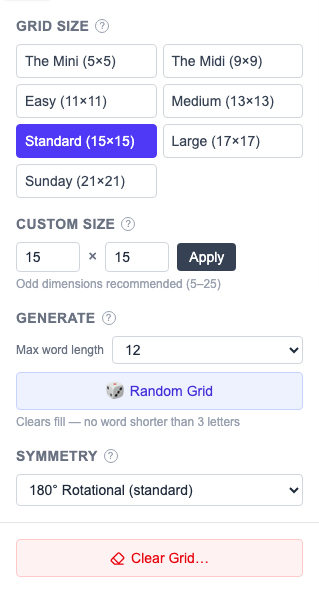
A banner under your words recommends a grid size, and marks the current size ✓ current once it matches. Set the size yourself in the Grid tab.
- 4
Click "Generate Puzzle from Words"
One click generates a black-square pattern, places your words at maximum priority, and fills remaining slots. Progress streams live.
✓ placed
Placed words appear with a green ✓ chip.
· not placed
Unplaced words stay grey with a dot. Try Regenerate (Larger) to bump the grid size.
- 5
Generate clues with one click
Click Generate Clues (Easy) for AI-written student-friendly clues. Groq and Google Gemini have free tiers.
No API key? Write clues manually — click each clue text area and type. The Dictionary tab shows definitions to help. - 6
Export as PDF
Click Export in the toolbar, then Download PDF — and Download Answer Key PDF for your own copy. To save ink, open the print-ready page instead and tick Black & white before printing.

Using your own definitions as clues
Provide definitions alongside words in CSV format to match your curriculum exactly:
OSMOSIS, "Diffusion of water through a semi-permeable membrane"
NUCLEUS, "Control center of the cell; contains DNA"
Upload as a .csv file via the upload button. Definitions become default clue text.
Tips for better puzzles
Keep words to 4–15 letters
Very short words are too easy; over 15 may not fit a 15×15 grid.
10–20 words is a sweet spot
Under 8 means too much filler. Over 25 on a 15×15 gets crowded.
Regenerate if a word didn't fit
Click Regenerate for a new attempt, or Regenerate (Larger) to bump the grid by 2.
Mark theme entries with ★
Click ★ in the Clues panel to highlight vocabulary words in the grid.
Save before regenerating
Sign in to save, then regenerate freely and duplicate favorites from the dashboard.
Sharing puzzles with students
Print: Download the PDF and print. Keep the answer-key PDF for yourself.
Web link: Sign in, click Share in the toolbar, and copy the URL. No account needed to solve.
Embed: Download the HTML player — a single file you can post on Google Classroom or any LMS.
QR code: The same Share popup shows a QR code — "Download QR code ↓" saves it as an SVG to drop into printed worksheets.